
From detection to integration
Take a challenge the resolvr extension detected straight into your code: export the task, solve it with one call, and submit the token, by hand or through a coding agent.
ON THIS PAGE
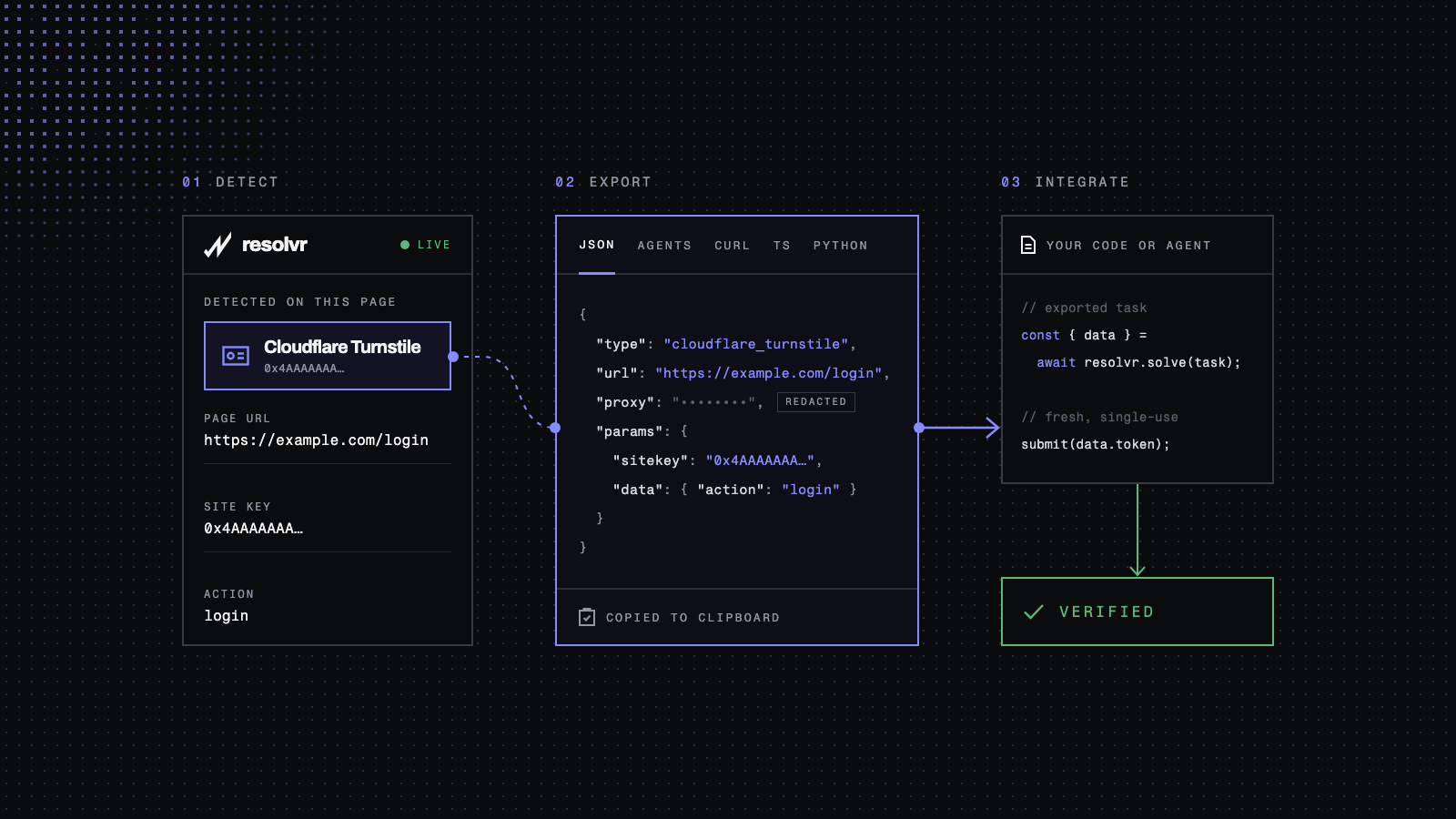
The resolvr extension has detected a challenge on the page you are automating. This post takes it from there into your code: the task the extension exports, the call that solves it, and the request that uses the token. The example is a Turnstile widget on a sign-in form at https://example.com/login.
Installing the extension, finding detections and running a test solve are covered in the installation guide. Detection and export are free and need no account; solving needs resolvr API access and a proxy.
Copy the task from the detection#
Open the detection in the popup. Two parts of that view matter for your code: the fields it captured, and the Export section a short scroll below them.
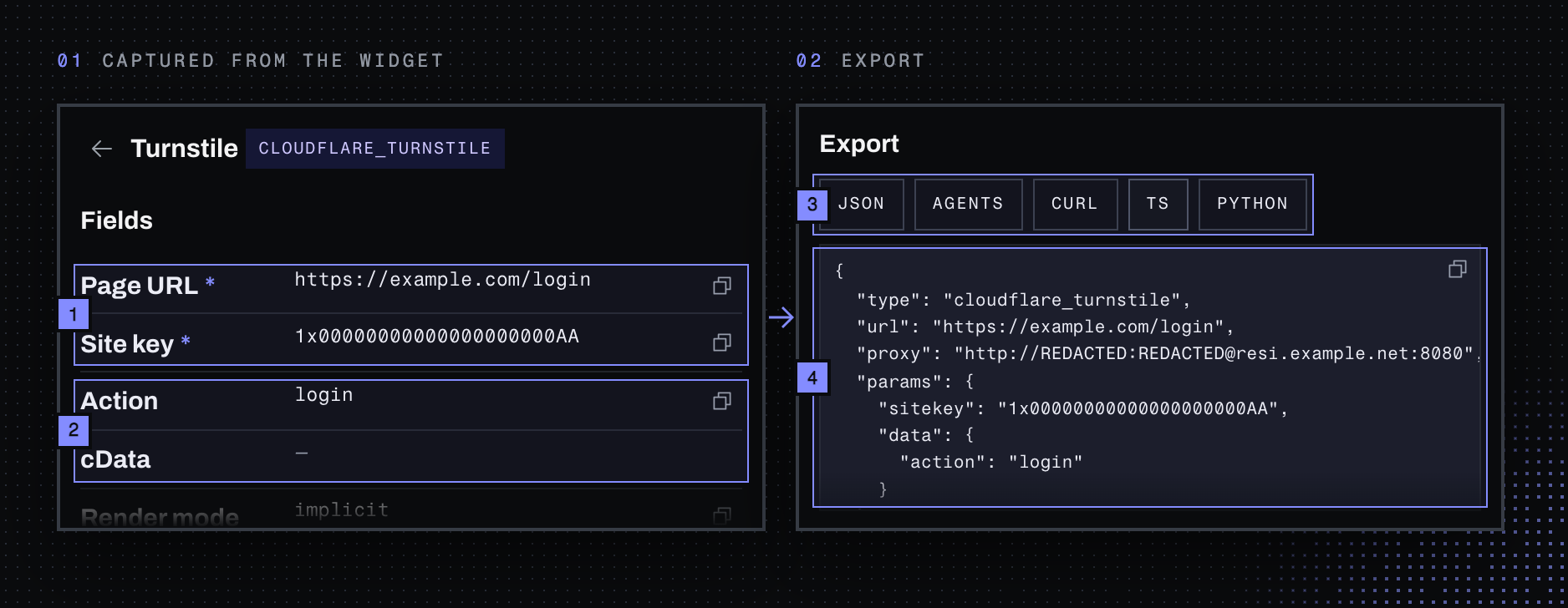
- Page URL and Site key are required, marked
*. They becomeurlandparams.sitekey. - Action and cData are optional. A dash means the widget sets none, so the task leaves it out. Do not invent one.
- One click per format. JSON, curl, TS and Python copy to the clipboard; Agents saves a Markdown brief as
resolvr-cloudflare_turnstile.md. - The task as it will be sent. Everything your code needs is in this object.
| You are writing | Use |
|---|---|
| TypeScript | TS, a client.solve() call with the task filled in |
| Python or a shell script | Python or curl, which create the task and poll for the result |
| Anything else over HTTP | JSON, the request body for POST /v1/task |
| Nothing yourself, an agent is | Agents, the brief described below |
Exports never contain your API key, and proxy credentials read
REDACTED. With no proxy saved in the extension there is noproxyfield at all, and every resolvr task needs one. Your code supplies both from the environment.
Solve it from your code#
This is the TS export with the two secrets moved to environment variables and the form submission added. solve() creates the task and polls until it finishes.
import { ResolvrClient } from "@resolvrlabs/sdk";
import { ProxyAgent, fetch } from "undici";

// Residential, with a sticky session: the form must leave from the IP that solved.
const proxy = process.env.RESOLVR_PROXY!;
const resolvr = new ResolvrClient({ apiKey: process.env.RESOLVR_API_KEY! });

export async function signIn(email: string, password: string) {
  // Solve right before submitting: the token is single-use and lasts about 300 seconds.
  const { data } = await resolvr.solve({
    type: "cloudflare_turnstile",
    url: "https://example.com/login",
    proxy,
    params: { siteKey: "1x00000000000000000000AA", data: { action: "login" } },
  });

  const res = await fetch("https://example.com/login", {
    method: "POST",
    dispatcher: new ProxyAgent(proxy),
    body: new URLSearchParams({ email, password, "cf-turnstile-response": data.token }),
  });
  if (!res.ok) throw new Error(`sign-in rejected: HTTP ${res.status}`);
  return res;
}
Four things decide whether this works:
- The task is the export, unchanged. Same
url, same site key, sameaction. The SDK spells itsiteKey; the JSON body spells itsitekey. - One proxy for both requests. The token is bound to the IP that solved it. A rotating proxy hands the form request a new IP and the token is refused, so use a sticky session.
- The token goes where the widget would have put it. A standard Turnstile form posts it as
cf-turnstile-response. If your target uses another name, the form request in your browser's network tab shows it. - Two ways to fail. A failed task reports
status: "failed"with anerrorsuch asERROR_IP_BANNEDorERROR_PROXY. A rejected submission is your target answering no. Keep them apart in your logs, and do not retry a failed task in a loop.
Without the SDK the flow is two calls: POST /v1/task with the exported JSON, then GET /v1/task/{task_id} until status is completed or failed. The GET long-polls for up to 5 seconds, so give your client a read timeout of 10 or more and do not sleep between calls. The Python and curl exports already do this; the API overview and the Turnstile reference have the details.
Hand it to a coding agent#
The Agents export is a brief an agent can implement from without seeing the page. It contains the goal, the detected fields, the task JSON, how to create and poll the task, the result shape, and the replay rules for this challenge type.
The brief says what to call. It does not say where in your project, so attach it and add a prompt in the same shape. Copy takes the whole prompt; replace the first line of Goal with your own function:
# resolvr integration task — Turnstile

Attached: `resolvr-cloudflare_turnstile.md`, the task brief exported by the resolvr browser extension. Its task JSON, endpoints and replay rules are the specification. Where this prompt and the brief disagree, the brief wins.

## Goal

Make `signIn()` in `src/signIn.ts` pass the Turnstile check: solve the challenge with resolvr right before the form is submitted, send the token with the form, and report whether the sign-in itself succeeded.

## Inputs

| Input | Value |
|---|---|
| API key | env `RESOLVR_API_KEY` |
| Proxy | env `RESOLVR_PROXY`, a residential proxy URL with a sticky session |
| Task | the JSON under "Create the task" in the brief. Its `proxy` is a redacted placeholder: take the real one from `RESOLVR_PROXY` |
| Casing | the JSON body is snake_case (`sitekey`); the TypeScript SDK's typed task is camelCase (`siteKey`) |
| Token field | `cf-turnstile-response`, unless the form posts a different name |

## Implement

1. Add one function, `solveTurnstile()`, that creates the task and returns `data.token`. In TypeScript use `@resolvrlabs/sdk`: `client.solve(task)` creates the task and polls correctly on its own, so do not wrap it in a loop. In any other language call `POST /v1/task`, then `GET /v1/task/{task_id}`, as the brief describes.
2. Call it immediately before the form submission. Never at startup, never cached, never reused.
3. Send the form request through `RESOLVR_PROXY` too, so it leaves from the IP that solved the challenge. In Node use `ProxyAgent` and `fetch` from `undici`. Calls to the resolvr API do not go through the proxy.
4. Return three distinct outcomes: the task failed (with its `error` code and `message`), the submission was rejected (with the HTTP status), or the sign-in succeeded. Success is whatever the existing code treats as success; keep that check. Anything else, such as a missing environment variable, throws.

## Rules

- Follow "Replay rules" in the brief exactly. If you poll over HTTP, follow "Retrieve the result" too: a read timeout of at least 10 seconds, no sleep between polls.
- One task per challenge. Do not retry a failed task, even when the error says it is retryable. Surface it and stop.
- Send the detected parameters exactly as the brief's task JSON has them: keep what is there, add nothing.
- No secrets in code, logs or commits. Never log the token.

## Done when

- The code type-checks and `signIn()` returns one of the three outcomes on every path.
- Unit tests, with the resolvr API and the target mocked, cover a completed task, a `failed` task and a rejected submission.
- You list the files you changed, the environment variables to set and the command that runs the tests.Where to go next#
Before you wire it in, a test solve in the popup runs the same task once and shows its phases, timing and token. It proves the task and your proxy; it does not prove your form accepts the token. That check belongs to your code.
The API overview covers the task lifecycle and every error code. If you do not have a key yet, request access.

